

Rachel Khan, a product designer at DBS Bank in Singapore, was already using AI at work, but mostly through trial and error. She wanted something more structured: practical skills built specifically for UX/product designers.
AI for UX Design gave her a toolkit she could apply across her whole design process, from fact-checking research to prototyping complex interactions. It also gave her a clearer sense of where AI still falls short.
After the course, she turned what she learned into a prompt library for her team, and encouraged her coworkers to level up their AI skills with formal training.
Designing in a regulated environment
Rachel designs retail banking experiences at DBS Bank, focusing on unsecured loans like personal loans and balance transfers. She also gets to work across rewards, credit cards and security features. Before that, she spent two and a half years on the bank's enterprise design team, building dashboards and digital workflows for employees.
DBS encourages its designers to build AI skills, but working in banking means regulatory constraints.
"We don't have access to the fanciest or the latest AI tools out there,” Rachel says. “So we deal with what we have within our workspaces."
To help close that gap, the bank offers a learning and development budget for courses and personal AI subscriptions, "just so that we can keep ourselves updated with the latest trends." Rachel used that budget to enroll in AI for UX Design.
Goals: from trial and error to a real workflow
Rachel wanted to bring AI into her design process to "design faster, iterate faster, or even synthesize research results faster." That meant changing how she'd been using it so far.
She wanted a structured course that would let her practice prompting techniques, and found that options built for UX designers were hard to come by. Then she stumbled on Designlab’s AI for UX Design course.
The lightbulb moments
The first takeaway Rachel points to is triangulation, or using different AI models to cross-check each other's answers.
"That wasn't something that I was doing or had even thought to do. So that was pretty enlightening."
It mirrored a habit she already had as a designer, which was cross-checking research references.
The research aspect of the course showed her the value of the human in the loop. While moving through that part of the curriculum, Rachel was also running usability testing at work alongside a UX researcher. She tried AI research synthesis on her own and compared the results to the researcher's report, and she found it difficult to get them to match.
"I could see the human UX researcher still has a lot of value when it comes to pulling insights from usability testing. Maybe I still have a long way to go in learning how to craft the right prompt."
Prototyping was another lightbulb moment. Rachel used to work screen by screen in Figma Make. The course showed her how to write one detailed brief that generates every screen at once.
The AI tool that surprised her most was Gamma. Rachel had tried using Claude to generate presentations, but the results never looked the way she wanted.
"With Gamma, I realized that having more structured templates is really helpful in generating a presentation with a more logical flow and visual style."
Learning from designers who do the work
What Rachel enjoyed most was learning from working UX designers. To her, it made a difference that the course was led by practitioners who are “figuring out AI in real time right alongside the rest of us."
That real-world experience also made the material easy to bring into her own work, even in a specialized field like banking. "What we were taught was a lot more practical and applicable to the way I work as a UX designer today." She also valued the feedback she received from her mentor, Sol Degl'innocenti.
"What we were taught was a lot more practical and applicable to the way I work as a UX designer today."
Outcomes: a faster process and a team that's learning with her
Rachel left with a deeper AI understanding and the hands-on experience she came for.
"Designlab gave me a comprehensive education on how to use AI across an end to end design workflow."
The gains are already showing up in her prototyping. Complex interactions like calculators used to require advanced Figma skills with variables and conditionals. With Figma Make, she estimates prototypes like these come together as much as 50% faster. Her next test is coming soon: a usability study where she'll build the prototype with Claude.
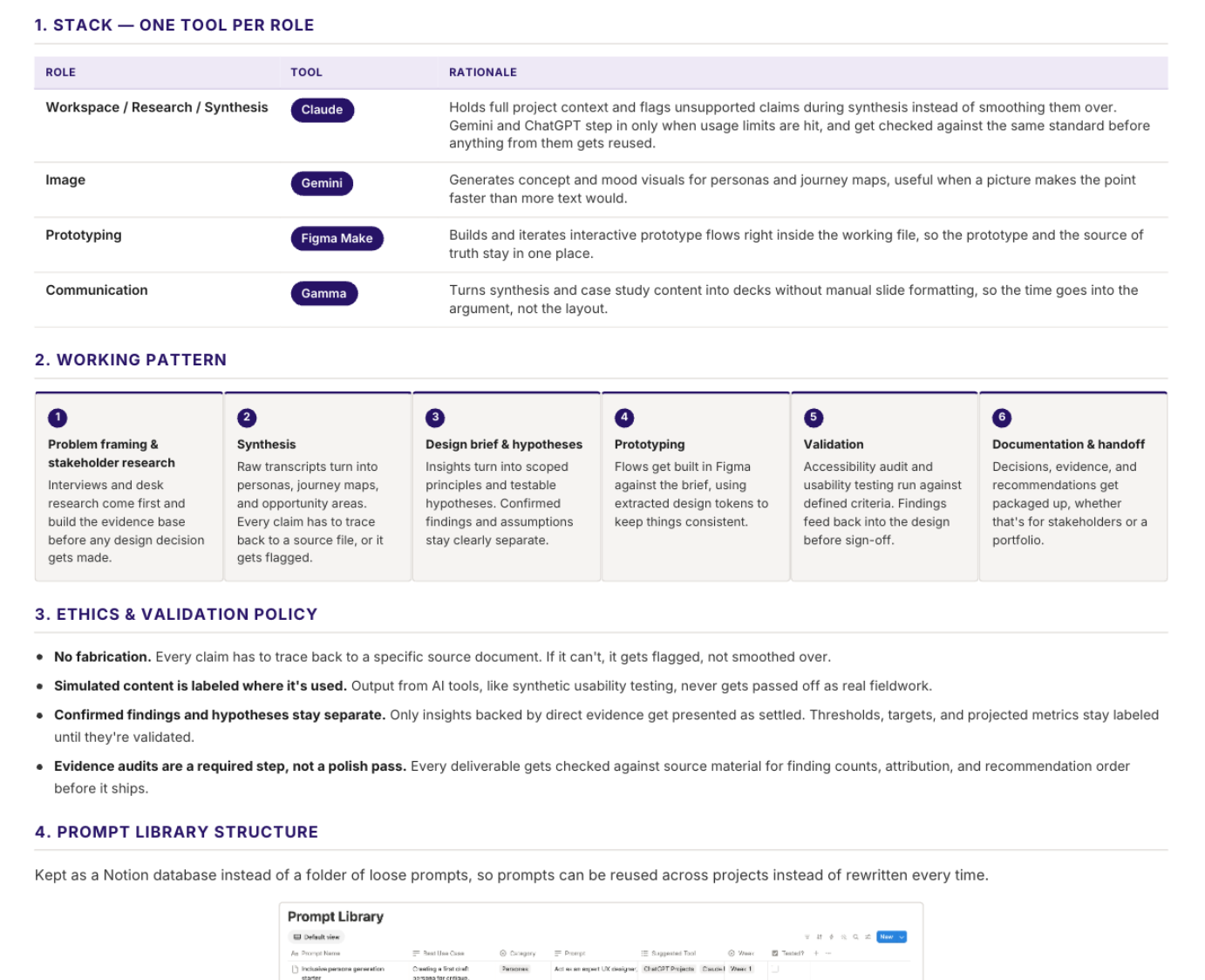
She hasn’t kept the knowledge to herself. Rachel uploaded her course materials into a Claude project, had it turn every prompt from the course into a Notion database, and shared her takeaways with her team. When coworkers asked about AI courses, she pointed them to Designlab.
"Designlab gave me a comprehensive education on how to use AI across an end to end design workflow."
Building the skill, not just the habit
Rachel came to the AI for UX Design course as a curious experimenter. Now, she has a structured approach she can carry from tool to tool, whatever her bank's workspace allows. Just as important, she learned where AI helps and where human judgment still matters.
She's now putting those skills to the test on real projects and sharing her knowledge within her team.