

Vibe Coding Camp
Turn designs into functional apps using powerful AI tools like Claude Code, Supabase, Vercel, and more. For more info, download the program syllabus.


Program Summary
.png)
About Vibe Coding Camp
AI-assisted coding is transforming how digital products get built. With the right tools, you can turn a static design into a functional prototype—complete with real data, interactions, and deployment—in a fraction of the time traditional development requires. Designers, PMs, and builders who understand this new workflow can experiment faster, collaborate more effectively with engineers, and bring ideas to life with unprecedented speed.
In Vibe Coding Camp, you’ll learn the modern AI-powered development stack—Claude Code, GitHub, Vercel, Supabase, and Figma MCP—and use them together to build and ship a working web app from scratch.
Whether you’re a designer, PM, or early-stage builder, Vibe Coding Camp will help you build faster, understand engineers better, and ship smarter by integrating AI directly into your development process.
Who It’s For
Vibe Coding Camp is for product designers, PMs, and builders who want to go beyond static or no-code prototypes and start creating real, working web experiences. If AI Prototyping Camp helps you generate screens, Vibe Coding Camp helps you bring those screens to life with interactions, data, and deployment.
This program is more technical than AI Prototyping Camp—but it’s designed specifically for people without a coding background. If you're ready to get your hands dirty, learn modern dev tools, and build something real, this camp is for you.
PRODUCT DESIGNERS who want to move past Figma-only prototypes, understand how code works, and collaborate more effectively with engineers by building functional prototypes themselves.
PMs who want a deeper technical foundation—learning how APIs, databases, and deployment fit together—so they can scope smarter, validate faster, and make better product decisions.
BUILDERS + INNOVATORS who want to ship working concepts using AI-assisted code generation, without needing years of programming experience.
Whether you’re stepping into technical workflows for the first time or leveling up your existing skills, Vibe Coding Camp gives you the confidence—and the tools—to build and ship functional product prototypes in a modern, AI-accelerated environment.
Session Schedule
%20(1).avif)
%20(3).png)
%20(1).avif)
%20(1).avif)
Meet the Instructors
.webp)
Brian Schwartz
Brian Schwartz is a Senior Consultant at Centric Consulting, where he currently serves as Human Centered Design Lead on a McDonald's Corporate engagement focused on agentic employee experiences. Previously, he led design for Daybright Financial's enterprise applications and was Senior Director of Service Design at PepsiCo. He's designed for other Fortune 500 companies in financial services, retail, and logistics, and helps evaluate unreleased frontier AI models.
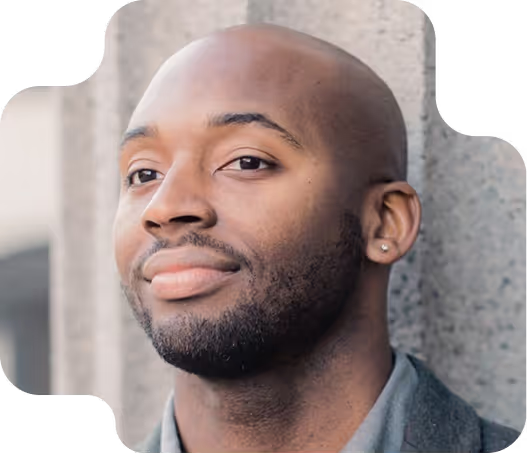
Jacques Debeuneure
Jacques Debeuneure is a Senior Manager of UX at Lowe’s, where he leads UX strategy and digital innovation. Previously, he was a Lead Product Designer at Lowe’s, a UX Manager at LendingTree, and a Product Design Manager at Red Ventures for AMEX. He's also designed for brands like ADT Security and Ingersoll Rand.
Which Designlab AI course is right for me?
Our AI programs complement each other while standing alone. AI for UX Design teaches how to integrate AI across your design workflow. AI Prototyping Camp helps you generate screens and explore concepts quickly with AI-powered prototyping tools. Vibe Coding Camp goes one step further by teaching you how to turn those concepts into functional, deployed web apps using real data and modern AI development tools.

.avif)

Showcase Your Work
Earn a certificate of completion when you attend all sessions of Vibe Coding Camp, and display it proudly on LinkedIn.

Frequently Asked Questions
You don’t need prior coding experience.
If you can use Figma (or any design tool), navigate your computer’s file system, and are comfortable (and have permissions for) installing software, you’ll be ready.
What is helpful:
- Basic familiarity with how websites work (browsers, URLs, “front end vs. backend”)
- Any exposure to HTML/CSS (even from years ago)
- Experience with an AI assistant (ChatGPT, Claude, etc.)
What is not required:
- JavaScript knowledge
- Command line experience
- Prior programming of any kind
We’ll teach you everything you need through AI-assisted workflows using tools like Claude Code.
No. The course is designed for beginners. You’ll write and edit code with AI support, guided templates, and instructor help. We introduce JavaScript concepts only as needed.
Vibe Coding Camp focuses on the modern AI-assisted development toolchain, including:
- Claude Code (Desktop + CLI) — your primary AI coding environment
- Figma MCP — to translate designs into real components
- Supabase — for database, CRUD, and basic authentication
- Vercel — for deployment, hosting, and environment variables
- GitHub — for version control and collaboration
You’ll use these tools together to build a working web prototype that uses real data.
A functional, deployed mini-app that includes:
- Interactive UI components
- Real API data
- A connected database (Supabase)
- User authentication (basic login)
- Live deployment on Vercel
It’s the kind of functional prototype/ app you can actually click, use, and share.
Vibe Coding Camp is comprised of 4 days of live sessions across four weeks, with each day's session(s) lasting about 3 hours. Each session is instructor-led and hands-on, combining demos, guided practice, and plenty of time to experiment with the tools yourself. In between sessions we provide light "homework" to give you the opportunity to practice the workflows/ tools in a supported environment. Additionally we'll have supplemental "office hours" between sessions for students who need additional support.
Plan for 60–120 minutes of homework between sessions. Assignments are structured, achievable, and designed to reinforce what you built in class.
- Claude – You'll need a Pro or Max subscription to access Claude Code and complete the coursework. Pricing varies by plan.
- Vercel – You can sign up for the hobby plan.
- Supabase – You can sign up for the free plan.
- Github – You can sign up for the free plan.
- Figma – Figma MCP remote servers are available on the free plan, but limited to up to 6 tool calls per month. Because of this limitation, we recommend that students have a paid Figma seat for the course. You’ll need a Full seat on the Professional, Organization, or Enterprise plans to use Figma MCP. This costs $20 per month.
The Figma Education Plan does not provide access to Figma MCP, so it cannot be used for this course.
AI Prototyping Camp helps you generate, iterate, and refine screen-based prototypes using AI tools like Figma Make and Lovable.
Vibe Coding Camp goes a level deeper.
You’ll move beyond static screens and learn to:
- Build functional web experiences with real interactions
- Work with real APIs and databases
- Use AI to write, debug, and deploy production-style code
- Ship your prototype live using modern engineering tools
If AI Prototyping Camp is about exploring ideas quickly, Vibe Coding Camp is about making those ideas real.
Vibe Coding Camp is priced at just $999 per enrollment. This includes admission to all sessions and breakout groups as well as access to session recordings afterwards in case you want to reference them in the future.
Yes. Students who attend all sessions and/ or watch session recordings may request that a Certificate of Completion be sent to them via email.
We currently offer discounts for veterans. We also offer a payment plan that allows you to pay half up front and half at the end of the course. To learn more, contact our admissions team.
If you're interested in bundling this course with other advanced courses, you can save $200 for 2 courses, $375 for 3 courses, or $600 for 4 courses. To get started selecting your course bundle, go here.
We strongly recommend attending live for the best experience—but if you can’t, replays will be available for all sessions.
Vibe Coding Camp is backed by The Designlab Happiness Promise. After you've fully participated in the course, if you're not satisfied you can get your money back. Read more here.
Absolutely! Many of our participants use their company’s learning and development budget to attend Designlab programs. If you have any questions about how to do this during enrollment, please reach out via our Help Center contact form.
To make things easier, feel free to copy/paste/edit the email template below when requesting approval or reimbursement:
Subject: Request to Use L&D Budget for Vibe Coding Camp
Hi {Manager Name},
I wanted to share a program called Vibe Coding Camp that I’d love to attend using my learning & development budget. It’s offered by Designlab, a platform that’s trained thousands of design and product professionals at companies like Netflix, Amazon, and Google.
The program is designed to help me:
- Build hands-on skills with AI-assisted development tools like Claude Code, Vercel, GitHub, and Supabase
- Learn how to turn designs into functional, interactive prototypes with real data
- Strengthen my technical fluency so I can collaborate more effectively with engineering and move ideas into working concepts faster
It runs across four live sessions that combine instruction, demos, and guided building. The final session is a full end-to-end “ship day,” where participants create and deploy a small working app. All sessions are recorded so I can revisit them anytime.
The full cost is $999 USD, and you can check out the full program details here.
Thanks,
{Your Name}
We’re happy to work with a team or company. Feel free to enroll everyone here or book a call with our team for more information on multi-seat discounts, custom trainings, and more.
.avif)
Join the Vibe Coding Revolution
Schedule a call with our team to learn more or enroll now to save your spot in the program.


