





As an Associate UX Designer on the enterprise team at Milwaukee Tool, Nghi Pham spends her days designing for a unique and demanding user base: large construction companies that manage hundreds or thousands of connected tools across job sites and warehouses. The design system primarily supports the One Key app, where enterprise customers track, customize, and transfer equipment at scale.
Nghi's focus is on the web and Android experiences, but because the web experience had long been overshadowed by Milwaukee Tool's more polished iOS and Android counterparts, the design system had fallen behind, and the team lacked a clear process.
A colleague suggested Nghi look into Designlab's Advanced Figma course—and Milwaukee Tool's annual education budget made it easy to say yes.
"The web experience has been a little bit neglected over the years," she says. "So through this course, I've actually learned a lot about component creation and have started taking steps to rebuild the web system to be more sophisticated."
What Nghi Wanted From Advanced Figma
Nghi came into the course as a self-taught Figma user. With about a year and a half on the job, she had picked up Figma the way many early-career designers do: by taking existing files apart and reverse-engineering how they were built.
While her proficiency was functional, she knew there were gaps. Her goals for the course were focused:
- Understand Figma variables beyond the basics. Nghi had a surface-level familiarity with variables, but she wanted to understand the full depth of what they could do.
- Learn component creation properly. Without a structured foundation, she was building components reactively, creating new ones for every use case rather than designing for reuse.
- Build the foundation to take ownership of the web design system. With more of the team's design work concentrated in web, Nghi wanted to help lead that effort.
Through this course, I've learned a lot about component creation and have started taking steps to rebuild the web system to be more sophisticated.
Deeper Figma Thinking
What Nghi didn't expect was how much the course would change the way she thinks about design systems at a fundamental level.
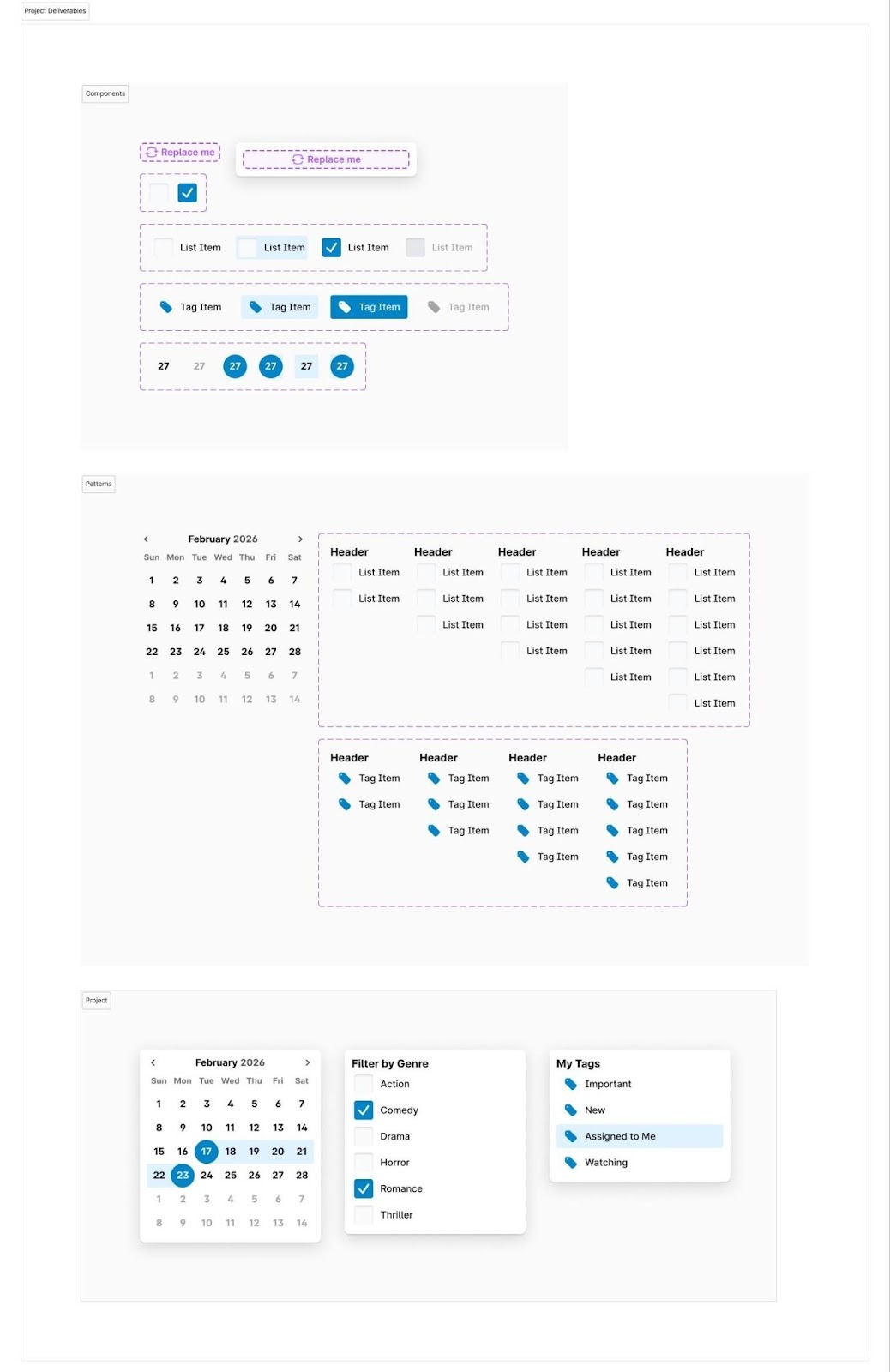
The biggest revelation wasn't variables themselves but component properties. "I was somewhat familiar with variables—more of just changing the color—but the property pieces were really interesting to me. I'd never really explored that."
Learning how to design components that could flex across multiple contexts reframed how she approaches her work.
"Before, my initial thought would always be: here's [a component] I'm going to create for this specific use case. And then if another one came up, I would just make it as a variable, rather than tweaking what we have and using those properties to adjust—variable swaps, text field changes, things like that."
The course pushed her to think differently: how bare-bones can a component be, while still being adaptable enough to serve multiple situations? That shift, she says, is changing the way she builds.
She also recognized a connection between what she was learning in Figma and how front-end developers structure their work, something that hadn't been part of her early UX education. "I understand a little more of the front-end design systems and how they build out their components," she says. "It's very similar to how Figma has its properties. I thought that was really cool."
Peer Learning and Connection
Nghi appreciated that the course was structured around her schedule. Like many of her peers, she was juggling full-time work alongside the coursework, and the self-paced format made that balance manageable.
She also noted that the peer sessions evolved in a useful direction. While early sessions had fewer questions, the instructors adapted, incorporating bonus lessons when the group needed more depth.
Gradually, the cohort became a close-knit group. "We were able to ask more questions and see others' work more [over time]," she says. “And we were all helping each other out.”
Nghi noted that despite everyone coming in with different backgrounds and approaches, the group gradually converged around similar workflows—not by imitation, but because the methodologies taught in the course were inherently more efficient.
Diverse Guidance from Mentors
Nghi found value in the feedback and guidance she received from mentors Blake Arnsdorff and Melvin Hogan. The opportunity to experience two distinct approaches added to her learning.
"They both had very different styles in how to build things, like laying stuff out versus building piece by piece using layouts. It was really interesting to see. It was really helpful for people who had a different way of building things."
[Our mentors] had different styles and ways of building things...it was really interesting and helpful.
Putting Learning to Practice
For early-career designers like Nghi who learned Figma on the job, Advanced Figma offers a structured foundation for building a consistent, intentional design practice.
Nghi came into the course knowing the basics of Figma and left knowing how to leverage advanced strategies and think systematically. She has now begun taking the lead on rebuilding Milwaukee Tool's web design system, applying what she has learned about component architecture, properties, and variables to create a more scalable and sustainable system.
It's a collaborative effort, but Nghi is taking meaningful ownership of it. For a designer who is still relatively early in her career, that's a significant shift, one the course has helped accelerate.
“Now being able to build out the design system for web, it will be way more efficient for all of us. So I feel more confident in manning that space.”


.webp)



.webp)


