





With nearly a decade of UX experience, Dan Staton, Design Lead at CVS Health, is deeply involved in shaping member-facing experiences within the CVS app. As AI began rapidly influencing design workflows, he wanted a structured way to understand the tools, strengthen his process, and stay ahead of emerging trends.
“I wanted to stay on top of where the industry is going,” he says. “I didn’t yet know how to leverage AI, and I wanted to learn how to use it effectively.”
That motivation led him to enroll in Designlab’s AI for UX Design course—four weeks that left him with new skills, fresh confidence, and a clearer understanding of how AI can enhance the design process.
A Structured Roadmap for Learning AI
At CVS Health, Dan leads design efforts for third-party partner integrations in the CVS app, which often requires working across teams and stakeholders. His team recently launched free yoga and fitness content for CVS members, a project that reaffirmed the value of seamless cross-functional collaboration.
His goals going into the course were clear:
- Learn how to use AI throughout the entire design process
- Build confidence speaking to the value of AI
- Understand which tools are best for research, concepting, high-fidelity design, and storytelling
- Find ways to stay hands-on and future-focused in an evolving design landscape
The course’s structure and content—research, low-fidelity concepting, high-fidelity design, and storytelling—immediately resonated with Dan.
“I thought the course was fantastic,” he says. “It really showed which tools to use for each part of the design process.”
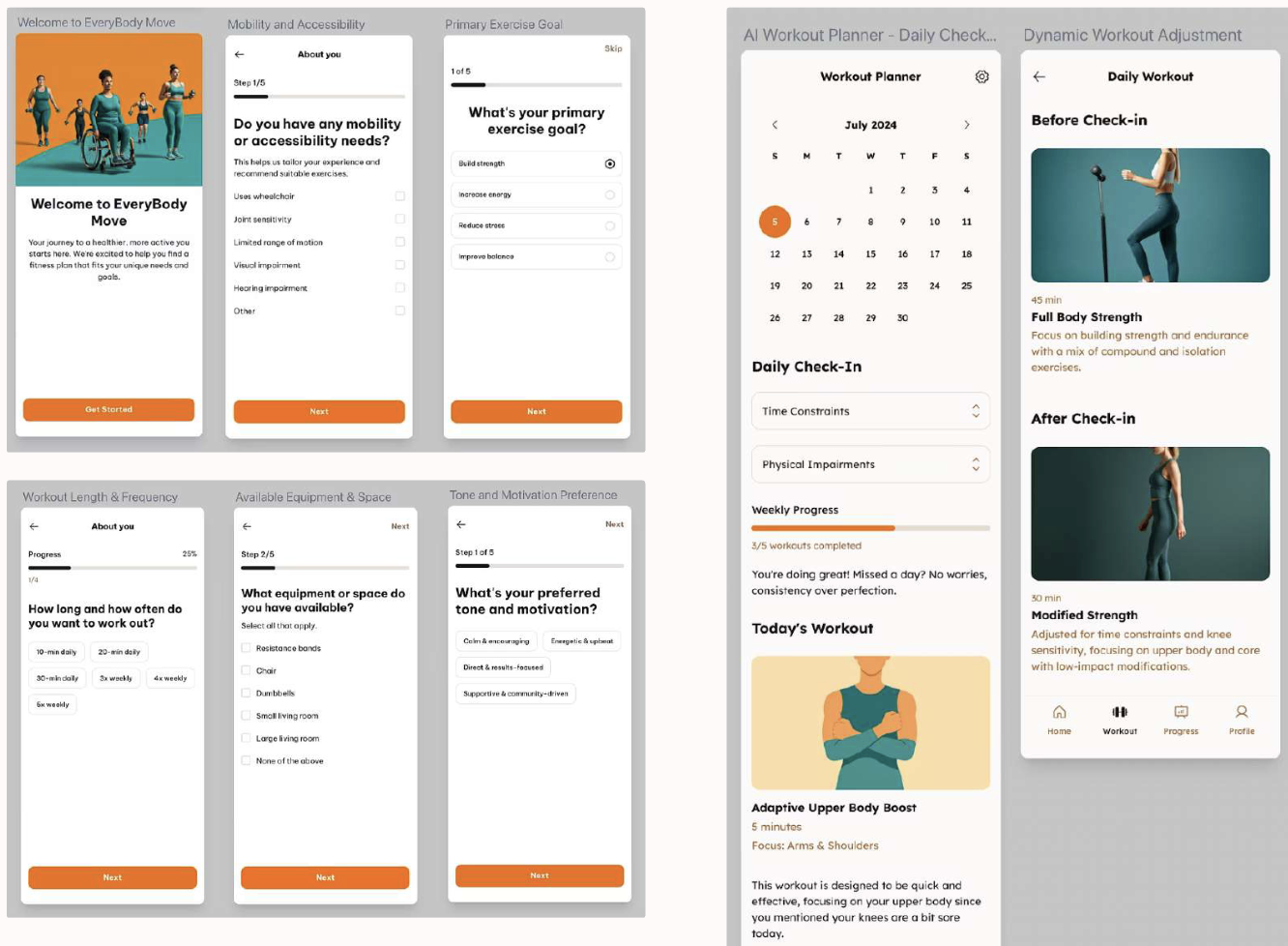
Perhaps even more importantly though, the course gave Dan an appreciation for where AI outputs are lacking and where the human element of a designer is still required.
“It took the four weeks to truly understand how much designers need to check AI for ethics, for bias, for the sources it cites,” he says. “It became clear how complex AI-powered design really is. Designers aren’t going anywhere.”
Learning Through Real Demos & Real Context
Each week of the course began with a live lecture led by course creator Chrissy Welsh, where she walked through real prompts, tools, and troubleshooting. Even when watching the recordings, Dan felt immersed in the experience.
“Her demos were so great because they were so real,” he explains. “She would make mistakes, fix them, rephrase prompts, and troubleshoot. It felt like I was working right there with her.”
The mentorship component reinforced that learning. In weekly peer sessions, Dan’s mentor Matthew Schneider encouraged students to bring in challenges from their actual roles, making the material immediately applicable. Between the lectures, documentation, and flexible guidance, Dan felt the course met him exactly where he was.
Applying New Skills with Confidence
After completing the course, Dan walked away with a set of practical, immediately usable AI workflows that he was able to fold directly into his day-to-day responsibilities at CVS Health. Many of these practices were entirely new to him, yet quickly became essential to how he researches, concepts, and produces design work.
There’s so much fear around AI…but the course showed how much of a collaborator it is—and how skilled you have to be to use it correctly.
Here’s what he’s now doing differently:
- Using AI as a Persona Simulator: Helps him quickly test content, explore user reactions, and generate persona-specific insights without lengthy manual setup.
- Uploading CVS’s Content Style Guide to Copilot: Ensures that all AI-generated content automatically aligns with brand standards and maintains consistency across deliverables.
- Prompting and Concepting: Accelerates early exploration by generating concept directions while maintaining privacy by masking sensitive or proprietary details.
- Leveraging AI Throughout Research and Ideation: Supports faster synthesis, early thinking, and brainstorming, enabling him to move from ideas to tangible outputs more efficiently.
These new skills also reshaped how Dan views AI’s role in design. Rather than something to fear, he now sees it as a collaborative partner—one that still requires human judgment, design fluency, and ethical decision-making to be effective.
“There’s so much fear around AI…but the course showed how much of a collaborator it is—and how skilled you have to be to use it correctly.”
With practical skills, newfound confidence, and a deeper understanding of where designers remain essential, Dan is excited to continue integrating AI into his day-to-day work—and stay hands-on in the craft he loves.
“AI isn’t taking over design anytime soon,” he says. “What it is doing is helping me work better, think smarter, and save time for the parts of design that matter most.”
Interested in learning how to integrate AI tools and workflows into your own design process? Check out AI for UX Design, Designlab's popular AI course for product designers and UX designers. Cohorts launch monthly.


.webp)



.webp)


